REST API Access is an advanced feature. Contact your administrator about purchasing a license upgrade for Security for Confluence.
Security for Confluence Cloud exposes a REST API so you can schedule scans, read findings, review findings, manage rules and settings, and pull exports from your own scripts and CI pipelines instead of clicking through the app.
REST API requests are authenticated using an API key issued from the app's administration screen.
Step 1 — Issue an API key
Go to Settings -> Soteri Settings.
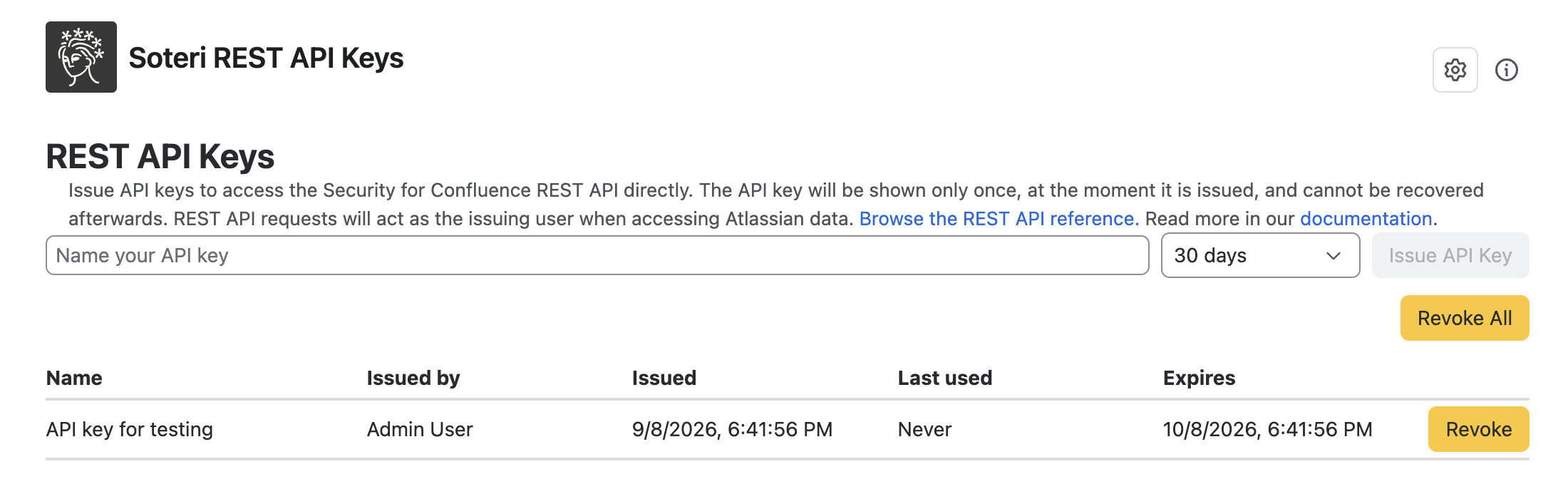
Select REST API Keys from the buttons at the top of the page to open the REST API keys page.
Enter a name in the Name your API key field. Use something that identifies the script or system that will hold it.
Choose an expiry. Keys cannot be issued for longer than one year, and the expiry cannot be extended later. To keep a script running past the expiry date, issue a new key and revoke the old one.
Select Issue API Key.e
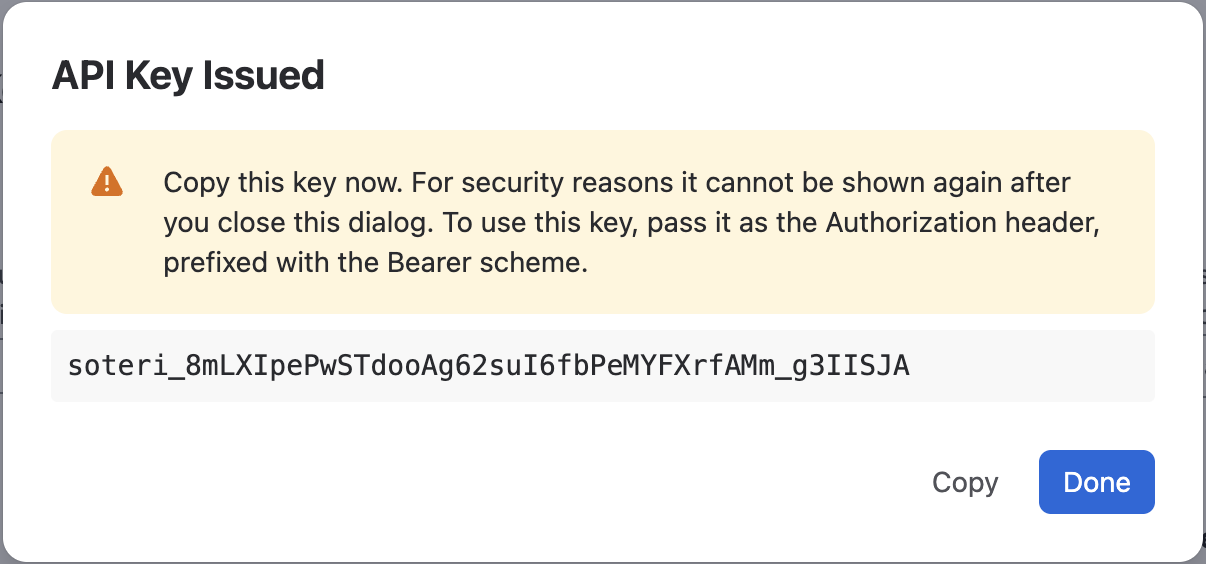
The key is then shown once, in the API Key Issued dialog. Select Copy, store the value in your secret manager, then select Done. Soteri does not store your key, so if you lose the value there is no way to recover it. Revoke the key and issue a new one.
Step 2 — Make a request
Send the copied value in the Authorization header (with the Bearer scheme) of an HTTPS request to https://security-for-confluence.soteri.io.
You do not need to include your Atlassian site URL anywhere: the API key identifies both your site and the user it acts as.
The reference lists every operation with its parameters, request bodies, and response schemas, and lets you try requests directly in the browser by pasting your API key into its authentication field. Because the spec is a standard OpenAPI 3 document, you can also feed it to a client generator such as openapi-generator, or import it into Postman or Insomnia.
How API keys are scoped
A key acts as the app administrator who issued it. This means:
Data visibility follows that user. Requests can reach every space that user can view. Two keys issued by two different administrators may return different results for the same request.
Changes are attributed to that user. Actions taken through the API appear in the Soteri audit log under the issuing user's name, not under the name of the key.
A key stops working if:
The key reaches its expiry date.
The key is revoked.
The user who issued it is no longer an app administrator of Soteri Security.
The site's license is no longer Advanced Edition.
Working with exports
Exports run in the background, so they follow a three-step flow:
Start the export with the settings you want.
Poll for its status.
Download the file when it is ready.
Sample scripts for exporting findings in a space:
Bash
Bash
#!/usr/bin/env bash
# Usage:
#     export SOTERI_API_KEY="soteri_..."
#     ./export-space-findings.sh --space-id 123456 --output findings.csv

set -o errexit
set -o nounset
set -o pipefail

# The endpoint that starts a findings export for a single space.
readonly SPACE_FINDINGS_EXPORT_PATH="/rest/space/findings"

# The shared endpoints for polling an export job and downloading the file it produced.
readonly EXPORT_JOBS_PATH="/rest/export/jobs"

# How long to wait between polls, and how long to keep polling before giving up. An export of a large
# space takes minutes rather than seconds.
readonly POLL_INTERVAL_SECONDS=5
readonly POLL_TIMEOUT_SECONDS=$((30 * 60))

space_id=""
output_path="findings.csv"
rule_names=""
deduplicate_findings=true

# The status code and body of the most recent response. They are globals rather than the output of
# ${request}, because a command substitution would run that function in a subshell and lose the body.
response_status=""
response_body=""

# Print a usage message and exit.
usage() {
    cat <<'USAGE'
Usage: export-space-findings.sh --space-id ID [--output PATH] [--rule-names NAMES] [--no-deduplicate]

  --space-id ID       The numeric ID of the space to export.
  --output PATH       Path the exported CSV is written to. Defaults to findings.csv.
  --rule-names NAMES  Comma-separated rule names to restrict the export to, for example
                      'AWS Access Key ID,Slack Token'. Defaults to every rule.
  --no-deduplicate    Write a row for every version of the content a finding appears in, instead of
                      reporting each finding once as the Security Analysis page does.

Set SOTERI_API_KEY before running this script.
USAGE
}

# Report a fatal error and stop.
#
# Arguments:
#   $1 The message to report.
fail() {
    echo "$1" >&2
    exit 1
}

# Describe a failed response using the app's error body when it sent one.
#
# Errors are returned as a JSON body with a title, an optional description, and any field-level
# violations. A response that carries no such body (a proxy error page, for example) falls back to its
# status code and raw text.
#
# Arguments:
#   $1 The status code of the failed response.
#   $2 The body of the failed response.
describe_error() {
    local status_code="$1"
    local body="$2"

    local description
    description="$(jq -r '
        if type == "object" and has("restErrorTitle") then
            [.restErrorTitle, .restErrorDescription // empty]
                + [(.violations // [])[] | "\(.fieldName): \(.message)"]
            | join(" - ")
        else
            empty
        end' <<<"$body" 2>/dev/null || true)"

    if [[ -z "$description" ]]; then
        description="$(head -c 200 <<<"$body" | tr -d '\n')"
    fi

    echo "HTTP ${status_code}: ${description}"
}

# Make an authenticated request, storing its outcome in ${response_status} and ${response_body}.
#
# The app's administration screen copies keys without the "Bearer " scheme attached. The value is accepted
# with or without it.
#
# A response is only read into ${response_body} when the request failed or when no file was given for it,
# so that a successful download is streamed straight to disk rather than held in memory.
#
# Arguments:
#   $1 The HTTP method.
#   $2 The URL to request.
#   $3 The file the response body is written to, or empty for a temporary one.
request() {
    local method="$1"
    local url="$2"
    local body_file="${3:-}"

    local token="${SOTERI_API_KEY# }"
    if [[ "$token" != [Bb][Ee][Aa][Rr][Ee][Rr]\ * ]]; then
        token="Bearer ${token}"
    fi

    local body_is_temporary=false
    if [[ -z "$body_file" ]]; then
        body_file="$(mktemp)"
        body_is_temporary=true
    fi

    # A 4xx or 5xx response is handled by the caller, so curl is not asked to fail on one.
    response_status="$(curl --silent --show-error --location \
        --request "$method" \
        --header "Authorization: ${token}" \
        --header "Accept: application/json,text/csv" \
        --write-out '%{http_code}' \
        --output "$body_file" \
        "$url")"

    response_body=""
    if [[ "$body_is_temporary" == true || "$response_status" != 2* ]]; then
        response_body="$(cat "$body_file")"
    fi
    if [[ "$body_is_temporary" == true ]]; then
        rm -f "$body_file"
    fi
}

# Start the export of a space's findings, and report the ID of the job it created.
#
# Outputs:
#   The ID of the created export job, on standard output.
start_space_findings_export() {
    local url="${SOTERI_BASE_URL}${SPACE_FINDINGS_EXPORT_PATH}?spaceId=${space_id}"
    if [[ -n "$rule_names" ]]; then
        url+="&ruleNames=$(jq -rn --arg names "$rule_names" '$names | @uri')"
    fi
    # The server defaults to deduplicating, so the parameter is only sent when turning it off.
    if [[ "$deduplicate_findings" == false ]]; then
        url+="&deduplicateFindings=false"
    fi

    request POST "$url"
    if [[ "$response_status" != 2* ]]; then
        fail "Could not start the export. $(describe_error "$response_status" "$response_body")"
    fi

    jq -r '.jobId' <<<"$response_body"
}

# Poll an export job until its file can be downloaded.
#
# Arguments:
#   $1 The ID of the export job.
wait_until_ready() {
    local job_id="$1"
    local deadline=$((SECONDS + POLL_TIMEOUT_SECONDS))
    local last_progress=""

    while true; do
        request GET "${SOTERI_BASE_URL}${EXPORT_JOBS_PATH}/${job_id}"
        if [[ "$response_status" != 2* ]]; then
            fail "Could not read the status of export ${job_id}. $(describe_error "$response_status" "$response_body")"
        fi

        local status
        status="$(jq -r '.status' <<<"$response_body")"

        case "$status" in
            READY)
                return 0
                ;;
            FAILED)
                fail "Export ${job_id} failed: $(jq -r '.errorMessage // "no reason given"' <<<"$response_body")"
                ;;
            DOWNLOADED)
                fail "Export ${job_id} has already been downloaded, and cannot be downloaded again."
                ;;
            # An export that was running on a node that shut down is rescheduled automatically, so
            # INTERRUPTED is not a terminal state.
            PENDING | IN_PROGRESS | INTERRUPTED) ;;
            *)
                fail "Export ${job_id} reported an unexpected status: ${status}"
                ;;
        esac

        # Only report progress when it changes, so a long export does not produce a line per poll.
        local progress
        progress="$(jq -r '
            if .totalTargetsCount then
                "  \(.status): \(.completedTargetsCount // 0) of \(.totalTargetsCount) items exported"
            else
                empty
            end' <<<"$response_body")"
        if [[ -n "$progress" && "$progress" != "$last_progress" ]]; then
            echo "$progress"
            last_progress="$progress"
        fi

        if ((SECONDS >= deadline)); then
            fail "Export ${job_id} was still ${status} after ${POLL_TIMEOUT_SECONDS} seconds."
        fi
        sleep "$POLL_INTERVAL_SECONDS"
    done
}

# Stream a finished export's CSV file to disk.
#
# The file is streamed to a temporary path first, so that a refused download leaves no partial CSV behind
# and its JSON error body can be read instead.
#
# Arguments:
#   $1 The ID of the export job.
download_export() {
    local job_id="$1"

    local download_file
    download_file="$(mktemp)"

    request GET "${SOTERI_BASE_URL}${EXPORT_JOBS_PATH}/${job_id}/download" "$download_file"
    if [[ "$response_status" != 2* ]]; then
        rm -f "$download_file"
        fail "Could not download export ${job_id}. $(describe_error "$response_status" "$response_body")"
    fi

    mv "$download_file" "$output_path"
}

# Parse the command line arguments into the variables declared above.
parse_args() {
    while (($# > 0)); do
        case "$1" in
            --space-id)
                space_id="${2:-}"
                shift 2
                ;;
            --output)
                output_path="${2:-}"
                shift 2
                ;;
            --rule-names)
                rule_names="${2:-}"
                shift 2
                ;;
            --no-deduplicate)
                deduplicate_findings=false
                shift
                ;;
            --help | -h)
                usage
                exit 0
                ;;
            *)
                usage >&2
                fail "Unrecognized argument: $1"
                ;;
        esac
    done

    if [[ ! "$space_id" =~ ^[0-9]+$ ]]; then
        usage >&2
        fail "--space-id is required, and must be the numeric ID of a space."
    fi
}

main() {
    parse_args "$@"

    command -v curl >/dev/null || fail "This script needs curl."
    command -v jq >/dev/null || fail "This script needs jq."

    if [[ -z "${SOTERI_API_KEY:-}" ]]; then
        fail "Set SOTERI_API_KEY before running this script."
    fi
    SOTERI_BASE_URL="https://security-for-confluence.soteri.io"

    local job_id
    job_id="$(start_space_findings_export)"
    echo "Started export ${job_id} for space ${space_id}."

    wait_until_ready "$job_id"
    echo "Export ${job_id} is ready. Downloading..."

    download_export "$job_id"
    echo "Wrote ${output_path}."
}

main "$@"
Python
Python
#!/usr/bin/env python3
"""
Usage:
    export SOTERI_API_KEY="soteri_..."
    ./export-space-findings.py --space-id 123456 --output findings.csv
"""
import argparse
import os
import sys
import time

import requests

# The endpoint that starts a findings export for a single space.
SPACE_FINDINGS_EXPORT_PATH = "/rest/space/findings"

# The shared endpoints for polling an export job and downloading the file it produced.
EXPORT_JOBS_PATH = "/rest/export/jobs"

# Statuses that mean the export is still being produced. INTERRUPTED is included because an export that
# was running on a node that shut down is rescheduled automatically, so it is not a terminal state.
IN_PROGRESS_STATUSES = frozenset({"PENDING", "IN_PROGRESS", "INTERRUPTED"})

# How long to wait between polls, and how long to keep polling before giving up. A site-wide export of a
# large space takes minutes rather than seconds.
POLL_INTERVAL_SECONDS = 5
POLL_TIMEOUT_SECONDS = 30 * 60

# Size of the chunks the CSV is streamed to disk in, so that a large export is never held in memory.
DOWNLOAD_CHUNK_BYTES = 64 * 1024


def describe_error(response: requests.Response) -> str:
    """Describe a failed response using the app's error body when it sent one.

    Errors are returned as a JSON body with a title, an optional description, and any field-level
    violations. A response that carries no such body (a proxy error page, for example) falls back to its
    status line and raw text.

    :param response: The failed response.
    :return: A single-line description suitable for an error message.
    """
    try:
        body = response.json()
    except ValueError:
        return f"HTTP {response.status_code}: {response.text.strip()[:200]}"

    if not isinstance(body, dict) or "restErrorTitle" not in body:
        return f"HTTP {response.status_code}: {body}"

    parts = [body["restErrorTitle"]]
    if body.get("restErrorDescription"):
        parts.append(body["restErrorDescription"])
    for violation in body.get("violations", []):
        parts.append(f"{violation.get('fieldName')}: {violation.get('message')}")
    return f"HTTP {response.status_code}: " + " - ".join(parts)


def start_space_findings_export(session: requests.Session, base_url: str, space_id: int,
                                rule_names: str | None, deduplicate_findings: bool) -> dict:
    """Start the export of a space's findings.

    :param session: Session carrying the API key.
    :param base_url: Base URL of the app backend.
    :param space_id: The ID of the space to export.
    :param rule_names: Comma-separated rule names to restrict the findings to, or None for every rule.
    :param deduplicate_findings: Whether a finding that appears in several versions of the same content is
        reported once, as on the Security Analysis page, rather than once per version.
    :return: The created export job.
    """
    # The server defaults to deduplicating, so the parameter is only sent when turning it off.
    params = {"spaceId": space_id}
    if rule_names:
        params["ruleNames"] = rule_names
    if not deduplicate_findings:
        params["deduplicateFindings"] = "false"

    response = session.post(base_url + SPACE_FINDINGS_EXPORT_PATH, params=params)
    if not response.ok:
        raise RuntimeError(f"Could not start the export. {describe_error(response)}")
    return response.json()


def wait_until_ready(session: requests.Session, base_url: str, job_id: str) -> dict:
    """Poll an export job until its file can be downloaded.

    :param session: Session carrying the API key.
    :param base_url: Base URL of the app backend.
    :param job_id: The ID of the export job.
    :return: The job once it reports READY.
    """
    deadline = time.monotonic() + POLL_TIMEOUT_SECONDS
    last_progress = None

    while True:
        response = session.get(f"{base_url}{EXPORT_JOBS_PATH}/{job_id}")
        if not response.ok:
            raise RuntimeError(f"Could not read the status of export {job_id}. {describe_error(response)}")
        job = response.json()
        status = job["status"]

        if status == "READY":
            return job
        if status == "FAILED":
            raise RuntimeError(f"Export {job_id} failed: {job.get('errorMessage') or 'no reason given'}")
        if status == "DOWNLOADED":
            raise RuntimeError(f"Export {job_id} has already been downloaded, and cannot be downloaded again.")
        if status not in IN_PROGRESS_STATUSES:
            raise RuntimeError(f"Export {job_id} reported an unexpected status: {status}")

        # Only report progress when it changes, so a long export does not produce a line per poll.
        progress = (job.get("completedTargetsCount"), job.get("totalTargetsCount"))
        if progress != last_progress and progress[1]:
            print(f"  {status}: {progress[0] or 0} of {progress[1]} items exported")
            last_progress = progress

        if time.monotonic() >= deadline:
            raise RuntimeError(f"Export {job_id} was still {status} after {POLL_TIMEOUT_SECONDS} seconds.")
        time.sleep(POLL_INTERVAL_SECONDS)


def download_export(session: requests.Session, base_url: str, job_id: str, output_path: str) -> None:
    """Stream a finished export's CSV file to disk.

    :param session: Session carrying the API key.
    :param base_url: Base URL of the app backend.
    :param job_id: The ID of the export job.
    :param output_path: Path the CSV is written to.
    """
    with session.get(f"{base_url}{EXPORT_JOBS_PATH}/{job_id}/download", stream=True) as response:
        if not response.ok:
            raise RuntimeError(f"Could not download export {job_id}. {describe_error(response)}")
        with open(output_path, "wb") as output_file:
            for chunk in response.iter_content(chunk_size=DOWNLOAD_CHUNK_BYTES):
                output_file.write(chunk)


def build_session(api_key: str) -> requests.Session:
    """Build a session that authenticates every request with the given API key.

    The app's administration screen copies keys without the "Bearer " scheme attached. The value is accepted
    with or without it.

    :param api_key: The raw API key, optionally prefixed with "Bearer ".
    :return: A session carrying the Authorization header.
    """
    token = api_key.strip()
    if not token.lower().startswith("bearer "):
        token = f"Bearer {token}"

    session = requests.Session()
    session.headers.update({"Authorization": token, "Accept": "application/json,text/csv"})
    return session


def parse_args() -> argparse.Namespace:
    """Parse command line arguments.

    :return: The parsed arguments.
    """
    parser = argparse.ArgumentParser(description=__doc__, formatter_class=argparse.RawDescriptionHelpFormatter)
    parser.add_argument("--space-id", type=int, required=True, help="The numeric ID of the space to export.")
    parser.add_argument("--output", default="findings.csv", help="Path the exported CSV is written to.")
    parser.add_argument("--rule-names",
                        help="Comma-separated rule names to restrict the export to, for example"
                             " 'AWS Access Key ID,Slack Token'. Defaults to every rule.")
    parser.add_argument("--no-deduplicate", dest="deduplicate_findings", action="store_false",
                        help="Write a row for every version of the content a finding appears in, instead of"
                             " reporting each finding once as the Security Analysis page does.")
    return parser.parse_args()


def main() -> None:
    args = parse_args()

    base_url = "https://security-for-confluence.soteri.io"
    api_key = os.environ.get("SOTERI_API_KEY")
    if not api_key:
        sys.exit("Set SOTERI_API_KEY before running this script.")

    session = build_session(api_key)
    base_url = base_url.rstrip("/")

    try:
        job = start_space_findings_export(session, base_url, args.space_id, args.rule_names,
                                          args.deduplicate_findings)
        job_id = job["jobId"]
        print(f"Started export {job_id} for space {args.space_id}.")

        wait_until_ready(session, base_url, job_id)
        print(f"Export {job_id} is ready. Downloading...")

        download_export(session, base_url, job_id, args.output)
        print(f"Wrote {args.output}.")
    except RuntimeError as error:
        sys.exit(str(error))

if __name__ == "__main__":
    main()
Errors
Errors return a JSON body with a short title and, where available, a description:
JSON
{
  "restErrorTitle": "Bad Request",
  "restErrorDescription": "API key duration must be positive and at most one year."
}
Validation failures add a violations array naming the offending fields.
Rate limits
Requests are limited per site, across all API keys and the app's own screens together. Exceeding the rate limit returns 429 Too Many Requests with a Retry-After header giving the number of seconds to wait. Continuing to send requests while limited lengthens the wait, so honor Retry-After rather than retrying immediately.
Because the budget is shared with the app's own screens, a script that polls aggressively can slow the app down for people using it interactively. Prefer a several seconds between polls, and back off on 429 errors.
Managing and revoking keys
The REST API Keys screen lists every key on your site — including keys issued by other administrators — with:
Column
Detail
Name
The name given when the key was issued.
Issued by
The administrator who issued it.
Issued
When it was issued.
Last used
When it was last used for a request, or Never. Useful for finding keys which are no longer being used.
Expires
The expiry date.
You can either revoke individual keys, or all the API keys for the site at once. Revocation is immediate and cannot be undone.
Issuing and revoking keys is recorded in the Soteri audit log as Issued API key and Revoked API key, each naming the key and the administrator responsible. Revoking all keys records one event per key.
Keeping keys safe
Store keys in a secret manager. Not in source control, CI logs, or a Confluence page.
Issue one key per system. A key per script or pipeline means you can revoke one without disrupting the others, and the audit log and the Last used column tell you which one is which.
Use the shortest workable expiry and rotate on a schedule: issue the replacement, deploy it, then revoke the old key.
Revoke immediately if a key may have leaked. Revocation takes effect immediately.
A Soteri API key is itself a detectable secret. Security for Confluence Cloud ships a built-in scanning rule, SOTERI_API_KEY (under Built-in rules: IT Services), that recognizes the soteri_.... key format. The rule is enabled by default on newly installed sites.