|
Event
|
Detail fields
|
|
Global setting events
|
|
|
Updated app access configuration
updated_app_access
Author: The acting user
|
Added: The users and groups that were granted access, as a comma-separated list. Only recorded when it applies.
Removed: The users and groups whose access was revoked, as a comma-separated list. Only recorded when it applies.
|
|
Updated instance settings
updated_instance_settings
Author: The acting user
|
autoScan: Whether new and updated content is scanned automatically. Only recorded when it applies.
exportFindingText: Whether exports include the text of each finding rather than a link to it in context. Only recorded when it applies.
mlScanning: Whether AI model scanning is enabled. Only recorded when it applies.
requireReviewReason: Whether a reason must be given when a finding is marked as reviewed. Only recorded when it applies.
scanAttachments: Whether attachments are scanned. Only recorded when it applies.
|
|
Sent settings to Soteri Support
sent_settings_to_support
Author: The acting user
|
This event carries no detail fields.
|
|
Rule setting events
|
|
|
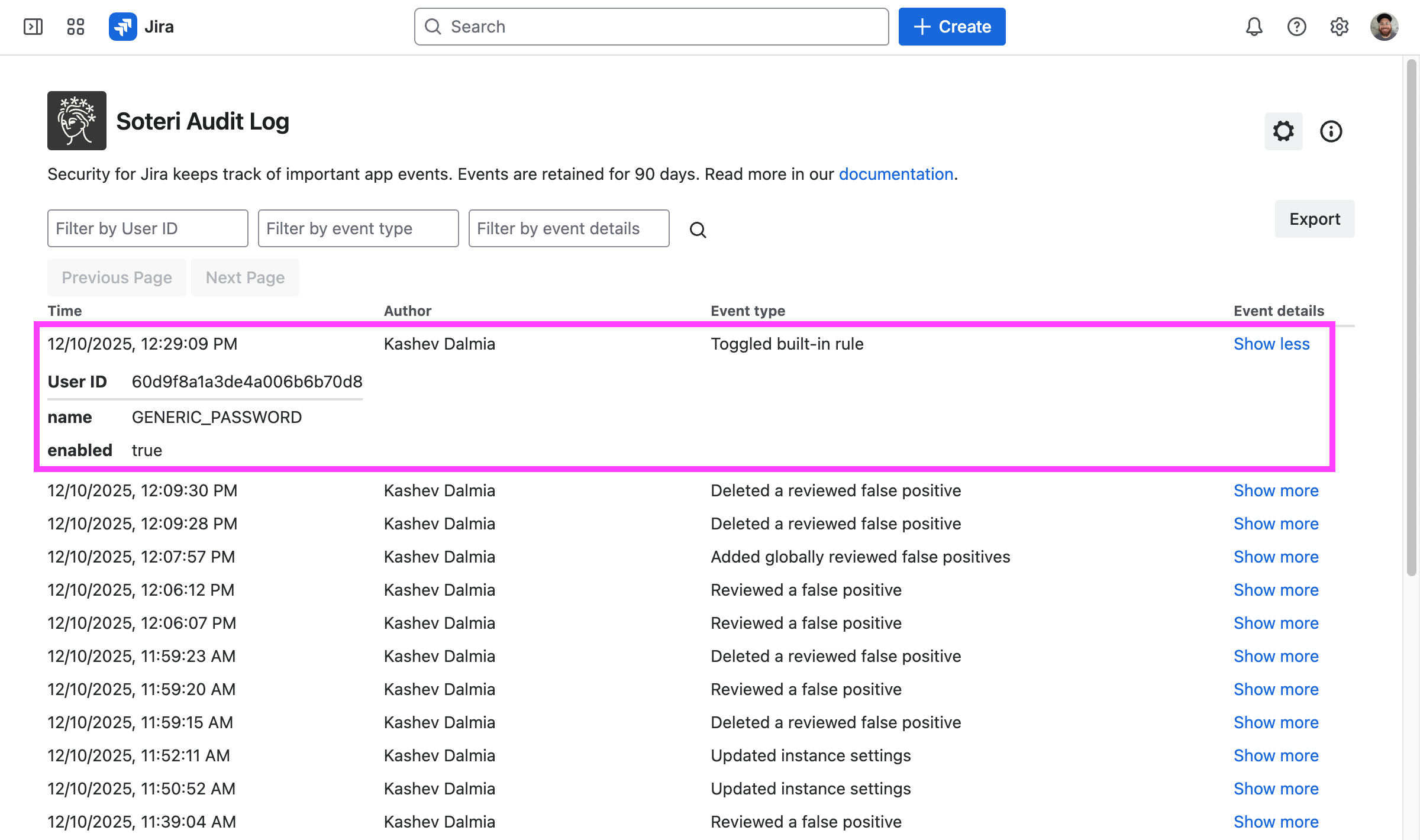
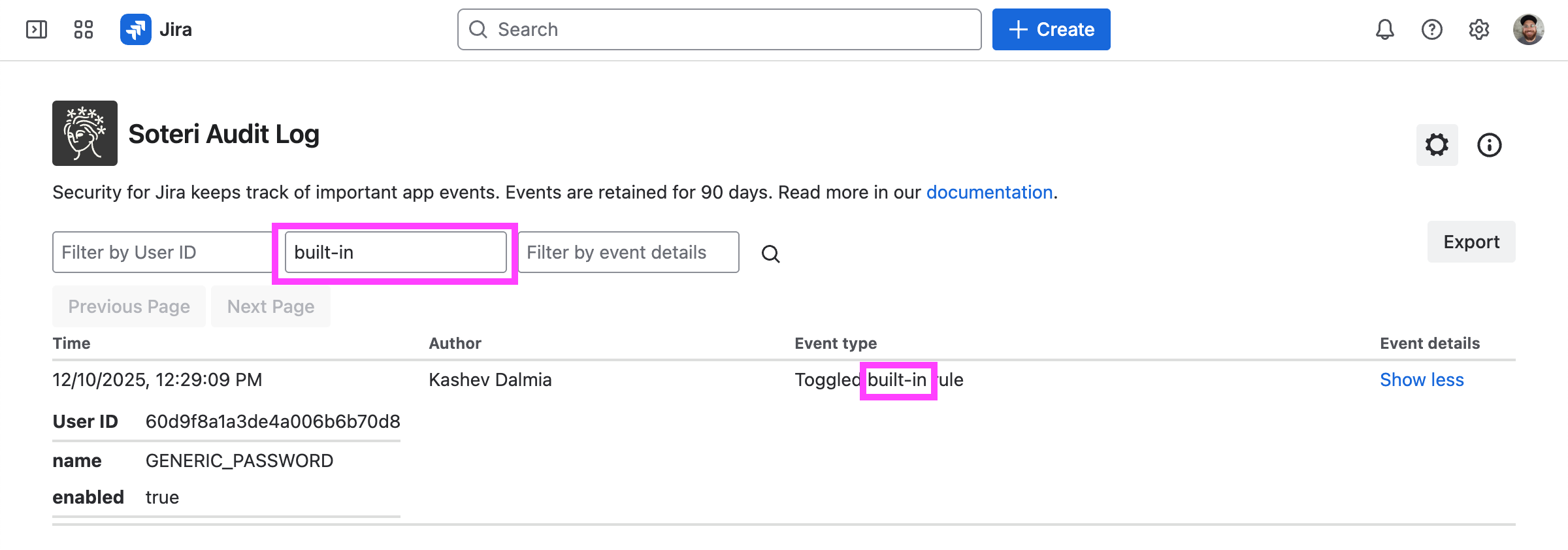
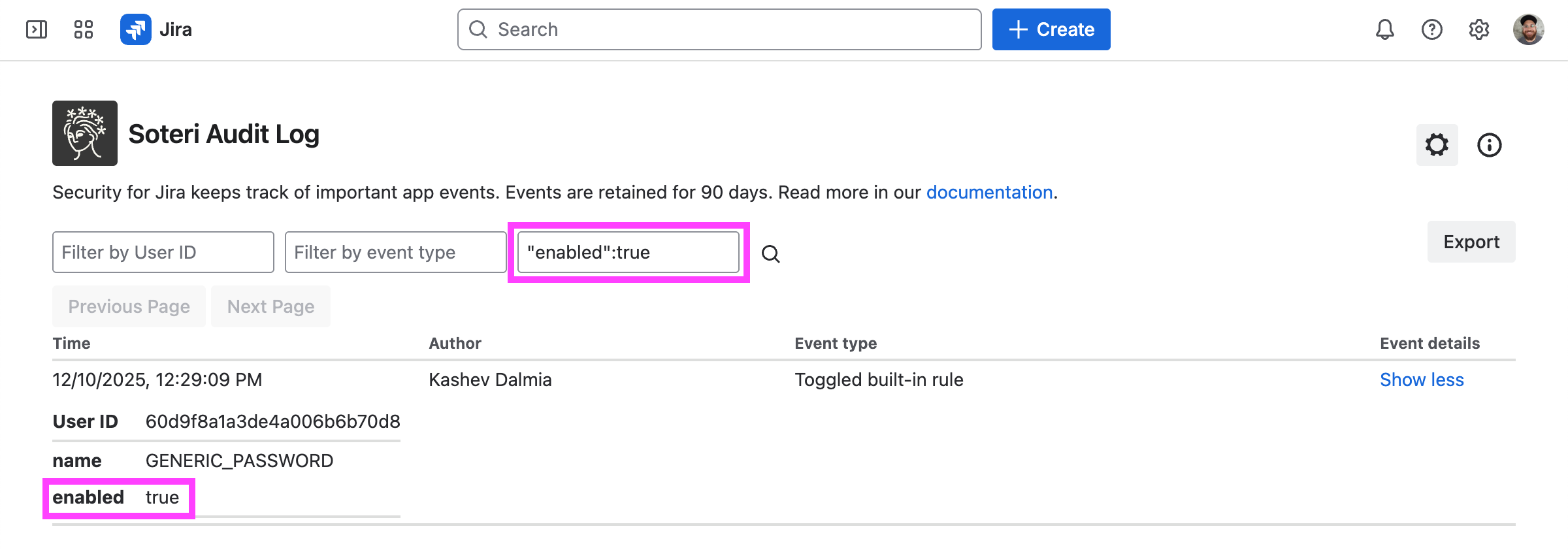
Toggled built-in rule
toggled_builtin_rule
Author: The acting user
|
enabled: Whether the rule is enabled.
name: The name of the built-in rule.
|
|
Updated email rule settings
updated_email_rule_settings
Author: The acting user
|
domainFilterMode: How the domain list is applied: NONE flags every email address, IGNORE_DOMAINS flags every address except those at the listed domains, and FLAG_ONLY_DOMAINS flags only addresses at the listed domains.
domains: The domains the filter mode applies to. Only recorded when it applies.
filterExampleEmails: Whether example and test addresses, such as test@ or any address at example.com, are treated as false positives.
filterRoleBasedEmails: Whether role-based addresses, such as support@ or noreply@, are treated as false positives.
|
|
Updated generic password rule settings
updated_generic_password_rule_settings
Author: The acting user
|
aiPasswordConfirmation: Whether an AI classifier confirms each generic password finding before it is reported.
aiPasswordConfirmationThreshold: The lowest confidence score, between 0 and 1, that the AI classifier can give a generic password finding for it to still be reported.
customPlaceholderPatternCount: How many custom placeholder patterns the generic password rule is configured with.
customRedactedPatternCount: How many custom redaction patterns the generic password rule is configured with.
filterEnvironmentVariables: Whether values that reference an environment variable or configuration lookup, rather than a hardcoded credential, are treated as false positives.
filterNullAndRedacted: Whether values that are empty or already redacted, such as [REDACTED] or ****, are treated as false positives.
filterPlaceholders: Whether placeholder values, such as CHANGE_ME, are treated as false positives.
filterTooShort: Whether values too short to be a real secret are treated as false positives.
|
|
Created custom rule
created_custom_rule
Author: The acting user
|
id: The ID of the custom rule.
name: The name of the custom rule.
regexp: The regular expression the custom rule matches.
|
|
Updated custom rule
updated_custom_rule
Author: The acting user
|
enabled: Whether the rule is enabled.
id: The ID of the custom rule.
name: The name of the custom rule.
previousEnabled: Whether the rule was enabled before the update. Only recorded when it applies.
previousName: The rule's name before the update. Only recorded when it applies.
previousRegexp: The rule's regular expression before the update. Only recorded when it applies.
regexp: The regular expression the custom rule matches.
|
|
Deleted custom rule
deleted_custom_rule
Author: The acting user
|
id: The ID of the custom rule.
name: The name of the custom rule.
regexp: The regular expression the custom rule matches.
|
|
Custom rule was automatically disabled
custom_rule_auto_disabled
Author: System
|
errorMessage: The message shown against the rule, explaining why it was disabled.
id: The ID of the custom rule.
name: The name of the custom rule.
reason: Why the rule was disabled: name_collision when its name is identical to another scanning rule's name, or the reason it failed during scanning, which is one of too_many_matches, timeout, stack_overflow, whitespace_only_matches, or too_short_matches.
regexp: The regular expression the custom rule matches.
|
|
Globally reviewed finding events
|
|
|
Added globally reviewed false positives
added_globally_reviewed
Author: The acting user
|
addedCount: How many of the uploaded entries were stored. An entry matching one already stored is skipped.
rowsWithoutMatchText: How many uploaded rows were skipped because they named no text to review. A row holding nothing at all is not counted.
skippedCount: How many uploaded rows were skipped for their review reason, either because the category named is not recognized or because no reason was given while the app requires one.
updatedCount: How many already stored entries had their review reason replaced by the upload, which also makes the uploading user their recorded reviewer.
uploadedCount: How many entries the uploaded file held, before they were matched against the stored ones.
|
|
Deleted globally reviewed false positives
deleted_globally_reviewed
Author: The acting user
|
deletedCount: How many stored entries were deleted.
rowsWithoutMatchText: How many uploaded rows were skipped because they named no text to review. A row holding nothing at all is not counted.
uploadedCount: How many entries were submitted for deletion, before they were matched against the stored ones.
|
|
Deleted all globally reviewed false positives
deleted_all_globally_reviewed
Author: The acting user
|
deletedCount: How many stored entries were deleted.
|
|
Exported globally reviewed false positives
exported_globally_reviewed
Author: The acting user
|
This event carries no detail fields.
|
|
Globally reviewed a false positive
globally_reviewed_finding
Author: The acting user
|
reasonCategory: The category chosen for the review reason. Only recorded when it applies.
reasonNotes: The note written to explain the review, truncated to 500 characters. Only recorded when it applies.
ruleName: The name of the rule whose finding prompted the review. A global review is not scoped to a rule, so this is recorded only when the caller named one. Only recorded when it applies.
scope: Always global, because the review applies to every matching finding in every project.
|
|
Deleted a globally reviewed false positive
deleted_globally_reviewed_finding
Author: The acting user
|
reasonCategory: The category chosen for the review reason. Only recorded when it applies.
reasonNotes: The note written to explain the review, truncated to 500 characters. Only recorded when it applies.
reviewTime: When the finding was originally reviewed. Only recorded when it applies.
reviewer: The Atlassian account ID of the user who originally reviewed the finding. Only recorded when it applies.
ruleName: The name of the rule whose finding the review was removed from. A global review is not scoped to a rule, so this is recorded only when the caller named one. Only recorded when it applies.
scope: Always global, because the review that was removed applied to every matching finding in every project.
|
|
Reviewed finding events
|
|
|
Reviewed a finding
reviewed_finding
Author: The acting user
|
attachmentId: The ID of the attachment. Only recorded when it applies.
commentId: The ID of the comment. Only recorded when it applies.
fieldName: The name of the work item field the review applies to. Only recorded when it applies.
issueId: The ID of the work item. Only recorded when it applies.
reasonCategory: The category chosen for the review reason. Only recorded when it applies.
reasonNotes: The note written to explain the review, truncated to 500 characters. Only recorded when it applies.
ruleName: The name of the rule the reviewed finding matched.
scope: space when the review applies to every matching finding in the project, or fine-grained when it applies to one work item.
spaceId: The ID of the project.
|
|
Deleted a reviewed finding
deleted_reviewed_finding
Author: The acting user
|
attachmentId: The ID of the attachment. Only recorded when it applies.
commentId: The ID of the comment. Only recorded when it applies.
fieldName: The name of the work item field the review applies to. Only recorded when it applies.
issueId: The ID of the work item. Only recorded when it applies.
reasonCategory: The category chosen for the review reason. Only recorded when it applies.
reasonNotes: The note written to explain the review, truncated to 500 characters. Only recorded when it applies.
reviewTime: When the finding was originally reviewed. Only recorded when it applies.
reviewer: The Atlassian account ID of the user who originally reviewed the finding. Only recorded when it applies.
ruleName: The name of the rule the reviewed finding matched.
scope: space when the review applied to every matching finding in the project, or fine-grained when it applied to one work item.
spaceId: The ID of the project.
|
|
Remediation events
|
|
|
Labeled content containing a finding
labeled_finding
Author: The acting user
|
issueId: The ID of the work item.
label: The label that was applied or removed.
spaceId: The ID of the project.
|
|
Removed the label from content containing a finding
removed_finding_label
Author: The acting user
|
issueId: The ID of the work item.
label: The label that was applied or removed.
spaceId: The ID of the project.
|
|
Deleted content containing a finding
deleted_content
Author: The acting user
|
attachmentId: The ID of the attachment that was deleted. Only recorded when it applies.
commentId: The ID of the comment that was deleted. Only recorded when it applies.
deleted: Which part of the work item was deleted: attachment, comment, or workItem. The work item ID alone cannot say, because a work item holds findings on its fields, comments, and attachments at once.
issueId: The ID of the work item.
spaceId: The ID of the project.
|
|
Space scan events
|
|
|
Queued full instance rescan
forced_instance_rescan_requested
Author: The acting user
|
This event carries no detail fields.
|
|
Scheduled space scan
scheduled_space_scan
Author: The acting user
|
forceRescan: Recorded as true when the scan was queued as a forced rescan, which scans content again even when nothing about it has changed since the last scan. Only recorded when it applies.
spaceId: The ID of the project.
spaceKey: The key of the project.
|
|
Scheduled content scan
scheduled_content_scan
Author: The acting user
|
contentId: The ID of the work item.
contentTitle: The key of the work item the scan was scheduled for. Only recorded when it applies.
contentType: Always work item, the only kind of content a scan can be scheduled for.
spaceId: The ID of the project.
spaceKey: The key of the project. Only recorded when it applies.
|
|
Started space scan
started_space_scan
Author: System
|
spaceId: The ID of the project.
spaceKey: The key of the project.
|
|
Finished space scan
finished_space_scan
Author: System
|
spaceId: The ID of the project.
spaceKey: The key of the project.
|
|
Error while running space scan
space_scan_error
Author: System
|
errorMessage: The error the scan stopped with. Only recorded when it applies.
spaceId: The ID of the project.
spaceKey: The key of the project.
|
|
Findings in content version
findings_found
Author: System
|
attachmentFilename: The filename of the attachment that was scanned. Only recorded when it applies.
attachmentId: The ID of the attachment. Only recorded when it applies.
authorAccountId: The Atlassian account ID of the author of the scanned version. Only recorded when it applies.
commentId: The ID of the comment. Only recorded when it applies.
contentTitle: The key of the work item the scanned comment belongs to. Only recorded when it applies.
findingsCount: How many new findings were detected.
issueId: The ID of the work item. Only recorded when it applies.
issueKey: The key of the work item, such as ABC-123.
scanReportUrl: A link to the app's security analysis of the work item.
timestamp: When the change that introduced the findings was made. Only recorded when it applies.
url: A link to the work item the findings were detected in.
violatedRuleNames: The names of the rules the new findings matched, as a comma-separated list.
authorName: The display name of the author of the scanned version. Only recorded when it applies. Webhook-only.
authorProfile: A link to the Atlassian profile of the author of the scanned version. Only recorded when it applies. Webhook-only.
|
|
Could not access space
could_not_access_space
Author: System
|
spaceId: The ID of the project.
spaceKey: The key of the project.
|
|
Webhook events
|
|
|
Added webhook
webhook_added
Author: The acting user, System
|
description: The webhook's description.
url: The URL the webhook posts to. Not recorded for Slack webhooks, whose URL is itself a credential. Only recorded when it applies.
|
|
Updated webhook
webhook_updated
Author: The acting user
|
authorizationChange: How the webhook's authorization header changed: added, updated, or removed. The header's value is never recorded, so this field is what reports the change. Only recorded when it applies.
description: The webhook's description. Part of a change summary.
enabled: Whether the webhook is enabled. Part of a change summary.
eventsAdded: The codes of the event types the webhook was subscribed to by this change. Only recorded when it applies. Part of a change summary.
eventsRemoved: The codes of the event types the webhook was unsubscribed from by this change. Only recorded when it applies. Part of a change summary.
headersAdded: The names of the custom headers this change added. Header values are never recorded, since a value can be a credential, and the authorization header is excluded. Only recorded when it applies. Part of a change summary.
headersRemoved: The names of the custom headers this change removed. Header values are never recorded, since a value can be a credential, and the authorization header is excluded. Only recorded when it applies. Part of a change summary.
headersUpdated: The names of the custom headers whose values this change replaced while keeping the name. The values are never recorded, so this field is what reports the change. Only recorded when it applies.
sharedSecretsAdded: The shared secrets this change added, each truncated to the same short form the app displays, so that the addition is auditable without the secret itself being recorded. Only recorded when it applies. Part of a change summary.
sharedSecretsRemoved: The shared secrets this change removed, each truncated to the same short form the app displays, so that the removal is auditable without the secret itself being recorded. Only recorded when it applies. Part of a change summary.
url: The URL the webhook posts to. Not recorded for Slack webhooks, whose URL is itself a credential. Only recorded when it applies. Part of a change summary.
|
|
Deleted webhook
webhook_deleted
Author: The acting user
|
description: The webhook's description.
url: The URL the webhook posts to. Not recorded for Slack webhooks, whose URL is itself a credential. Only recorded when it applies.
|
|
Webhook was disabled
webhook_disabled
Author: System
|
error: The error the webhook endpoint responded with.
temporary: true when the webhook was disabled for a few minutes and will retry by itself, false when it stays disabled until an administrator re-enables it.
url: The URL the webhook posts to. Not recorded for Slack webhooks, whose URL is itself a credential. Only recorded when it applies.
|
|
Export events
|
|
|
Exported findings
exported_findings
Author: The acting user
|
issueKey: The key of the work item, such as ABC-123. Only recorded when it applies.
projectKey: The key of the project the export covered. Only recorded when it applies.
scope: What the export covered: all spaces, recorded for an export of every project, attachment coverage for all projects, or attachment coverage for the single project named by projectKey. Only recorded when it applies.
|
|
Exported reviewed findings
exported_reviewed_findings
Author: The acting user
|
projectKey: The key of the project the export covered. Only recorded when it applies.
scope: Recorded as all spaces, which is the value used for an export covering every project. Only recorded when it applies.
|
|
Exported dashboard
exported_dashboard
Author: The acting user
|
This event carries no detail fields.
|
|
Exported audit log
exported_audit_log
Author: The acting user
|
authorFilter: The author substring the export was narrowed to. Only recorded when it applies.
eventDetailsFilter: The event detail substring the export was narrowed to. Only recorded when it applies.
eventTypeFilter: The event type substring the export was narrowed to. Only recorded when it applies.
|
|
Model rule events
|
|
|
Created model rule
create_model_rule
Author: System
|
confidence: The confidence score, between 0 and 1, above which the model rule reports a finding.
enabled: Whether the rule is enabled.
name: The name of the model rule.
ruleId: The ID of the model rule.
|
|
Updated model rule
update_model_rule
Author: The acting user, System
|
confidence: The confidence score, between 0 and 1, above which the model rule reports a finding. Part of a change summary.
enabled: Whether the rule is enabled. Part of a change summary.
name: The name of the model rule. Part of a change summary.
ruleId: The ID of the model rule. Part of a change summary.
|
|
Deleted model rule
delete_model_rule
Author: System
|
confidence: The confidence score, between 0 and 1, above which the model rule reports a finding.
enabled: Whether the rule is enabled.
name: The name of the model rule.
ruleId: The ID of the model rule.
|
|
API key events
|
|
|
Issued API key
issued_api_key
Author: The acting user
|
expiryTime: When the API key expires, after which it is no longer accepted.
name: The name of the API key.
|
|
Revoked API key
revoked_api_key
Author: The acting user
|
name: The name of the API key.
|